Download Norton 360 Premium for Windows—For Online Security
To protect yourself and your technology investment, download Norton 360 Premium for Windows. Designed to provide protection against security threats, you can also use Norton 360 Premium for features like parental controls and cloud storage.
Norton has been a trailblazer in antivirus protection for PCs for decades, and now their packages can protect your roster of devices with regularly updated functions that address emerging threats as they develop.
Why download Norton 360 Premium for Windows?
A full range of protective features
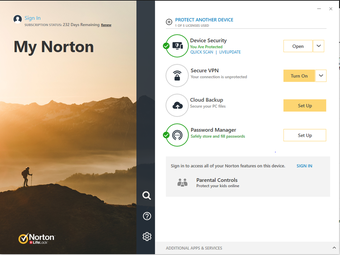
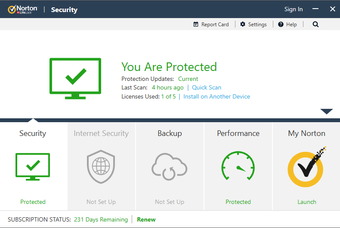
Norton 360 Premium takes a multipronged approach to threat protection. Off the bat, 360 Premium counters present and future malware threats to protect your online privacy via functions like:
- A secure VPN that keeps your browsing anonymous and sensitive information private.
- The password manager facilitates the safekeeping of your passwords and credit card information.
- With Dark Web Monitoring, you’ll be notified if your information is detected there.
Norton 360 Premium works to give you the most secure online browsing experience possible, with features like Privacy Monitor, which is similar to the Dark Web Monitor. It scans common data brokering websites for your information, so you can address it.
Solutions for families
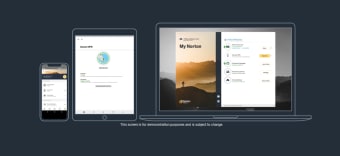
With a subscription sign on, Norton 360 Premium allows you to protect up to ten computers, whether Mac or PC, as well as smartphones and tablets. Averaged out over ten devices, the subscription fee is minimal in terms of the features available.
Beyond that, there’s a 60-day money-back guarantee on subscriptions. If Norton 360 Premium really doesn’t make sense for your team or family, there is adequate time to determine that without obligation.
Key Features
A suite of controls
Norton 360 Premium is geared toward managing online security for families, with features that are designed around your children's online use. Norton 360 Premium gives you control of your children’s browsing experience so they can discover and learn to use the internet safely.
Norton 360 Premium translates this into practical features like webcam notifications, where you are alerted if someone attempts to access your webcam. Beyond that, Norton 360 helps to block future webcam breaches. You can also manage your children’s remote learning experience so that remote school can be focused and safe.
Installation and integration
A Norton 360 Premium subscription can be applied to up to ten different devices, and that includes smartphones and tablets, along with computers. What’s more, the same number of devices can use its secure VPN. This makes it secure for devices to use public Wi-Fi, relieving you from worrying about which device was used where.
Because the 360 Premium plan protects so many devices, it also includes cloud backup storage up to 100 GB, which you can use to back up files and photos. It also protects them against hard drive crashes or malware attacks.
Implementing the software
In order to download Norton 360 Premium for Windows and get the most of safe browsing and protection for your devices and computers, you’ll want to have your PC updated with the necessary specifications.
Minimum system requirements:
- PS OS: Windows 7, 8, 8.1, 10, 11
- Mac OS: MacOS 10.13 or newer
- Android 10.0 or newer with the Google Play app installed
- Apple iOS for iPhone or iPad: current and two prior iOS versions
Beyond the 60-day guarantee, Norton 360 Premium also guarantees the app for quality. If your device gets infected by a virus and Norton can’t remove it, they give you a refund.
Benefits you might not know
Multiple tiers
Norton 360 Premium offers a robust set of controls and protections, but Norton also understands that there are varied levels of protection needed. With Norton’s tiered product range, you can opt for different plans that might be better suited to your needs.
Norton AntiVirus Plus and Norton 360 Deluxe offer lower levels of protection, features, and coverage on devices. If you need something bigger than 360 Premium, Norton 360 with Lifelock Select is the next tier up, which has a monthly subscription plan structure.
Even more protection
Users appreciate Norton 360 Premium as a top solution for group or family security packages because of its capacity to support ten devices, which keeps everyone safe from scams, malware attempts, phishing, and viruses. Its VPN lets you browse safely and privately, no matter where you are.
In addition, Norton 360 Premium is one step ahead with its Advanced AI scam protection. AI scans emails proactively, flagging those that are suspicious and finding scams that might be hidden in the body text, and it can do the same for calls.
A great group security resource
If you’re running a household or office that disperses multiple devices to multiple users, opting for Norton 360 Premium is a great one-stop solution to protect and secure your technological investment and safety.
Download Norton 360 Premium for Windows to experience a range of security tools and controls for up to ten devices. There’s a 60-day trial period with a money-back guarantee if you’re not satisfied, but its appealing price and range of functions make it a wise investment.
Norton 360 Premium offers a VPN for secure browsing, dark web protection, parental controls, and school time features, among other functions, making it a full coverage resource to give you peace of mind across the board for your whole crew.
Long trusted for antivirus software, Norton’s 360 Premium guarantees to protect your devices, or you get your money back, so download Norton 360 Premium for Windows today to ensure your group’s safety.